
Part of HVAC Controls, Detection & Efficiency: The Complete BuildMEP Guide →
BuildMEP HVAC Maintenance Guide
Package units almost never fail with a bang. Usually performance just fades a little at a time, until someone finally notices the rooms aren't cooling the way they used to. Working in a hospital, I learned fast that this isn't just an HVAC annoyance — one dead package unit can knock out several consultation rooms and mean rescheduling a full day of appointments. Once you've dealt with that once, you start taking preventive maintenance a lot more seriously.
The checks that stop the most package-unit downtime tend to be the simple ones: belt condition, filter differential pressure, evaporator and condenser airflow, fresh-air conditions, compressor current, pressure-trip history, and comparing trends against previous visits. Checking these once isn't really the point — what matters is catching them when they start to drift.
This guide grew out of the failures I kept running into on site. It's not a substitute for the manufacturer's maintenance schedule or for proper refrigerant diagnostics. The goal is narrower than that: pinpoint the checks that catch a package unit going downhill before the call turns into "the room's hot and the unit's dead."
1. Belt Condition: The Failure That Quietly Cuts Cooling
Belt damage on package-unit supply fans was one of the issues I ran into constantly. A belt can look fine and still be glazed, loose, slipping, or simply no longer moving the air the fan is supposed to deliver.
The obvious signs are cracking, glazing, odd vibration, or a squeal or chirp at startup. But there's a more useful clue, and it usually shows up before anyone hears a thing: airflow and cooling performance start drifting slowly away from what's normal.
Fan speed / airflow falls
Heat transfer deteriorates
Low suction / icing risk can develop
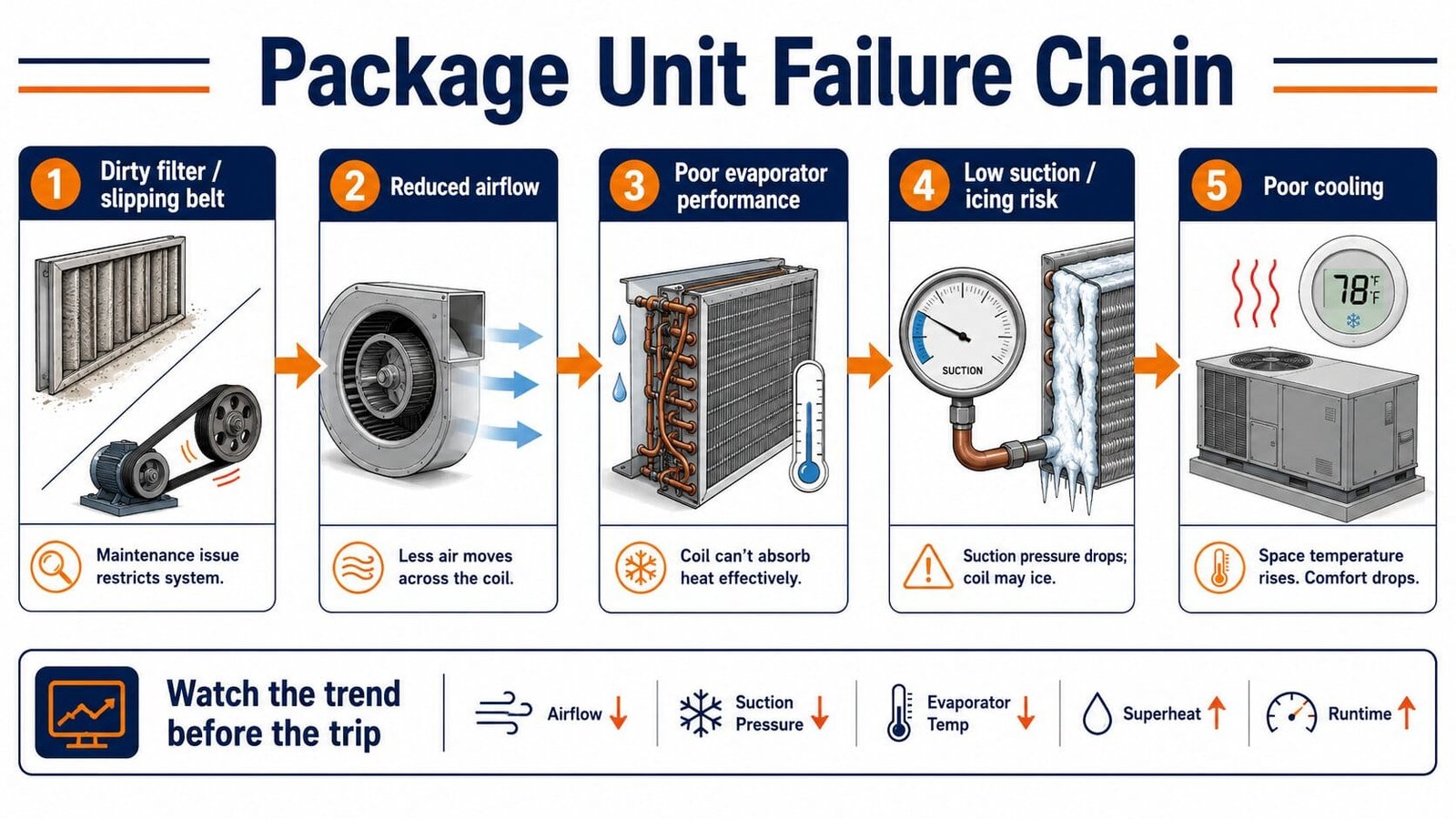
On a unit tied into a BMS, this often shows up as supply-air temperature sitting above setpoint, longer compressor run times, or the unit simply never quite satisfying the zone — even with no active fault showing.
A belt problem rarely trips a useful alarm on its own. The real first warning is the performance trend. If a unit that's normally steady suddenly needs a lot longer to do the same job, go check the fan side by hand.
2. Filter Differential Pressure: Watch the Trend, Not Just the Alarm
A dirty filter isn't only an indoor-air-quality problem — it's an airflow restriction. As resistance across the filter climbs, evaporator airflow drops and the unit loses cooling capacity. Push that restriction far enough and you risk evaporator icing along with abnormally low suction.
A differential-pressure sensor across the filter bank gives you a hard number to track that restriction by. But the alarm threshold isn't the whole story. The trend from your clean-filter baseline tells you how fast the system is clogging up.
Log the DP reading right after new filters go in. On the next few PPM visits, check that new reading against the baseline. A steady climb can justify swapping filters before you ever hit the alarm point.
This follows the same pressure-drop logic covered in the BuildMEP differential pressure control guide: rising pressure drop across a fixed component almost always means rising resistance.
3. Evaporator and Condenser Airflow Are Not the Same Problem
This distinction matters because the two sides of the unit produce different symptoms on the refrigeration side.
Restricted indoor airflow
Usual causes: dirty filters, slipping belts, blower trouble, and an iced-up or dirty evaporator coil.
Typical result: weak cooling, evaporator icing, and abnormally low suction pressure.
Poor heat rejection
Usual causes: dirty condenser coils, a failed condenser fan, blocked airflow, and very high ambient temperatures.
Typical result: elevated condensing pressure and, sometimes, a high-pressure trip.
Don't treat every airflow issue as a high-pressure issue. A dirty return-air filter and a dirty condenser coil are both "airflow problems," but they sit on opposite sides of the refrigeration circuit and usually show up as different pressure symptoms.
4. Fresh-Air Supply Can Make a Healthy Unit Look Broken
Where a dedicated fresh-air or heat-recovery AHU feeds pretreated outside air to the package units, that upstream system is really part of the package unit's operating condition, whether anyone thinks of it that way or not.
If the package unit was sized expecting tempered, partly dehumidified fresh air but is actually getting hotter, wetter air than intended, it may run longer, struggle to hit setpoint, or cycle in a way that looks exactly like a package-unit fault — even though its own components are fine.
So when a unit "isn't cooling enough," I don't just inspect the unit itself. I also check that the upstream fresh-air system is actually delivering the air condition the downstream unit was designed around.
5. Low Pressure, High Pressure, and Overload: Three Different Jobs
These devices are each watching for a different abnormal condition. Treat every trip as "compressor fault" and you'll waste time chasing the wrong thing.
| Protection | What it's watching | What I'd check first |
|---|---|---|
| Low-pressure switch | Suction pressure dropping below the allowed range | Evaporator airflow, icing, filter/belt condition, refrigerant charge, and refrigerant feeding |
| High-pressure switch | Discharge/condensing pressure running too high | Condenser coil cleanliness, condenser fans, airflow obstruction, ambient conditions, and refrigerant-side causes |
| Overload protection | Abnormal compressor motor current or temperature | Supply voltage, phase condition, compressor current, pressures, contactor, and compressor condition |
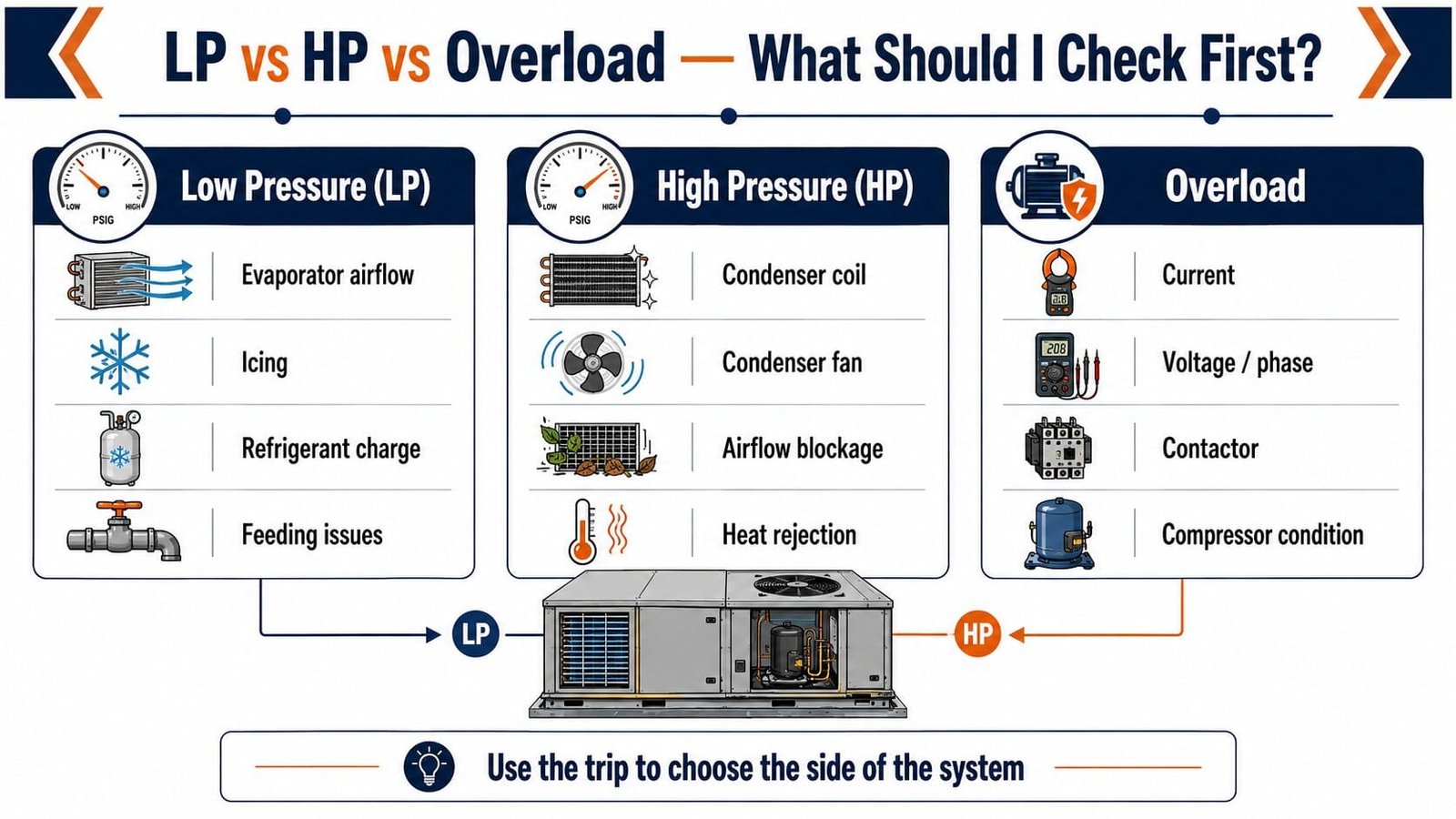
Actual pressure-switch settings depend on the refrigerant and the manufacturer, and the same goes for overload protection. Don't set or reset protection devices off a generic multiplier or some table you found online when the unit's own data is right there.
6. A Thermal Overload Can Take a While — But Waiting Isn't a Diagnosis
A hermetic compressor with an internal thermal protector may not restart right away after tripping on overload. The protector often needs the motor to cool down first, and depending on the compressor and conditions, that can take a good while.
That delay is real. But there's another side to it that only shows up once you've been in the field long enough.
Over one stretch I watched more than fifteen package-unit compressors fail. The pattern became impossible to ignore: when a compressor stayed unavailable well past a reasonable cool-down window, it usually had a genuine fault. At that point, waiting again, recovering refrigerant, and retrying almost never changed the outcome.
The takeaway isn't "wait X hours, then condemn the compressor." It's knowing when to stop treating the trip as a minor nuisance and start actual diagnostics.
That means checking supply voltage and phase condition, the contactor, winding condition, insulation to ground where relevant, compressor current or locked-rotor behavior, pressure conditions, the protection circuit, and the refrigerant circuit — before writing off the compressor.
A compressor that hasn't come back after a proper cooling period needs real electrical and refrigeration diagnosis. It shouldn't just get reset over and over because the last attempt didn't work.
7. Expansion Valve Problems Deserve Their Own Look
Not every repeat compressor issue starts with airflow.
A TXV or electronic expansion valve that's feeding incorrectly can cause real trouble. A starved evaporator will pull suction pressure down and eat into cooling capacity. Overfeeding, or losing proper superheat control, can send liquid refrigerant back to the compressor — floodback or slugging territory.
If airflow checks out fine and the unit still shows abnormal suction or superheat behavior, or keeps stressing the compressor, put the expansion device on the list instead of jumping straight to blaming the new compressor.
8. Trend Compressor Current — Don't Just Wait for the Overload Trip
An overload protector is reactive by design. It only fires after the compressor has already hit an unacceptable electrical or thermal state.
A better habit is measuring compressor running current under comparable conditions and comparing it against:
- previous readings from that same compressor,
- the unit/compressor nameplate data,
- phase-to-phase current balance on three-phase equipment, and
- the refrigeration pressures and load at the time you took the reading.
A rising current trend won't hand you the cause on its own, but it does tell you the compressor is behaving differently than it used to — which gives you a chance to investigate before the next event is an actual overload trip.
9. Regular PPM Turns These Checks Into an Actual Reliability System
None of this means much if it only gets done once.
A belt that's fine today can be slipping three months from now. Filter DP climbs gradually. Condenser coils get dirty over time. Fan bearings wear out. Compressor current and operating pressures drift.
The right PPM interval depends on the site, the equipment's duty cycle, the outdoor environment, and manufacturer requirements. What matters most is consistency: log the same key readings on every visit so the next technician actually has something to compare against.
Package Unit Troubleshooting Logic Helper
Pick the main symptom and what you're already seeing. This won't diagnose the unit for you — it just points you toward the side of the system worth checking first.
Always follow the unit manufacturer's service procedure, electrical safety requirements, and applicable refrigerant-handling rules.
Working Through a Package Unit PM Visit
- Check belt condition and tension. Look for glazing, cracking, slipping, misalignment, and startup noise.
- Check filter DP against the clean baseline. Watch the trend instead of waiting for the alarm threshold alone.
- Confirm evaporator airflow. Check filters, fan operation, coil condition, and icing.
- Inspect condenser heat rejection. Check coil cleanliness, condenser fans, and any obstructions.
- Verify upstream fresh-air temperature where a dedicated fresh-air or HRAHU system feeds the package unit.
- Review LP, HP, and overload history. A trip that resets on its own is still worth logging.
- Measure compressor current under comparable load. Compare it against previous readings and nameplate or manufacturer data.
- Check phase condition on three-phase equipment. Any current or voltage imbalance is worth chasing down.
- If airflow's normal but refrigeration behavior isn't, check the expansion device and refrigerant circuit.
- Log the results against the previous visit. The trend usually tells you more than any single reading.
Common Mistakes
- Waiting for a fault alarm instead of watching performance. Belt and airflow problems can eat into capacity long before a controller raises a useful alarm.
- Treating every airflow problem as a high-pressure problem. Evaporator and condenser airflow restrictions hit different sides of the circuit.
- Only replacing filters when the DP switch alarms. A rising DP trend gives you a much earlier warning.
- Assuming the pressure switch is the root cause. Usually it's just telling you some other condition has already gone abnormal.
- Resetting a compressor over and over with no diagnosis. Respect a genuine thermal reset delay, but repeated non-recovery deserves a real look.
- Using generic overload settings. Go by the compressor and unit data, and the actual protection design.
- Ignoring upstream fresh-air conditions. A perfectly healthy package unit can still struggle if it's fed air outside the condition it was designed for.
- Assuming every repeat compressor problem is airflow-related. TXV/EEV faults and other refrigerant-side issues can be the real root cause.
Frequently Asked Questions
How can I suspect a belt problem just from the BMS?
Watch for supply-air temperature that keeps drifting up, longer runtimes, or the unit failing to satisfy the same load with no corresponding compressor or safety alarm. That's not proof of a belt fault, but it's a solid reason to go inspect the fan and belt in person.
Is a high-pressure trip always a refrigerant problem?
No. Poor condenser heat rejection — a dirty coil, a failed condenser fan, blocked airflow — is a common culprit. Refrigerant overcharge, non-condensables, and other refrigeration faults can raise condensing pressure too.
Can a dirty filter cause a high-pressure trip?
A dirty indoor-air filter mainly chokes evaporator airflow, which more often cuts capacity, drops suction pressure, and can lead to icing. If you're seeing a high-pressure trip, look at the condenser/heat-rejection side separately rather than pinning it on the filter.
Why can a compressor take so long to restart after an overload?
Some hermetic compressors use internal thermal protection that only resets once the motor's cooled enough, and how long that takes varies. If the compressor's still down well past a reasonable reset window, move into proper electrical and refrigeration diagnosis instead of trying the same reset again.
Is tracking compressor current pointless if there's already an overload protector?
Not at all. The overload is a protective device; trending current is a maintenance tool. A shift in current for the same compressor under similar load can flag a change in operating condition well before the protection actually trips.
Does the fresh-air check apply to every package unit?
No — it applies specifically where a separate fresh-air, HRAHU, or DOAS-type system pretreats outside air before it reaches the package unit or the zone it serves.
Related BuildMEP Guides
- Differential Pressure Control in HVAC Explained
- How to Choose an Exhaust Fan: Bathroom and Kitchen Guide
- Spring Return Actuators Explained: Fail-Safe Logic in HVAC
Technical References
- Danfoss — Refrigeration pressure switches and controls
- Danfoss — Refrigeration troubleshooting and fault diagnosis
- Copeland — Compressor application / protection guidance
- Carrier — Airflow restriction and filter effects
Package-unit reliability tends to improve the moment technicians stop treating each trip as an isolated event and start looking at the chain behind it: airflow, heat rejection, electrical condition, refrigerant feeding, compressor load, and the trend since the last visit. The unit usually gives some warning before it fails — but only if someone's actually watching the right things.