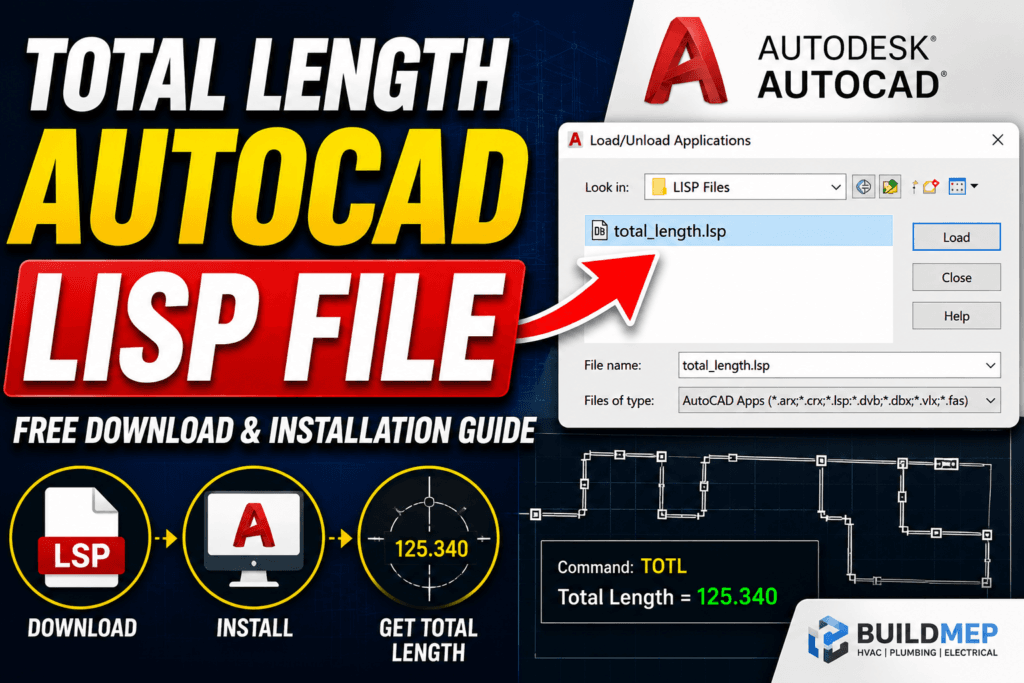

Need to calculate the total length of multiple lines or polylines in AutoCAD?
Monthly Engineering Briefing
Get notified when new BuildMEP guides and tools publish. One concise email a month.
The BuildMEP Total Length AutoCAD LISP instantly calculates the combined length of selected objects with a single command. It’s a lightweight productivity tool designed for HVAC engineers, architects, MEP designers, quantity surveyors, and CAD professionals who want faster and more accurate measurements.
| Quick Specs | |
|---|---|
| 💰 Price | Free |
| 📦 Version | 1.0 |
| 💾 File Size | 12 KB |
| 🖥 AutoCAD | 2018–2026 |
| 🎯 Difficulty | Beginner |
| ⏱ Install Time | 1 Minute |
Downloads Include
✅ Total Length AutoCAD LISP (.LSP) ✅ Easy installation guide ✅ Step-by-step YouTube video tutorial ✅ APPLOAD installation method ✅ Drag & Drop installation method
📦 Total Length AutoCAD LISP FREE
⬇ Download LISP File ▶ Watch Installation Video
📺 Video Tutorial
Watch the complete step-by-step installation guide below.
What Is an AutoCAD LISP?
AutoLISP is a scripting language developed specifically for AutoCAD. It allows users to automate repetitive tasks, create custom commands, and improve drafting efficiency.
Instead of performing multiple manual operations, a LISP routine executes them automatically with a simple command.
Thousands of engineers worldwide use LISP routines daily to improve their workflows.
What Is the Total Length of LISP?
The Total Length LISP calculates the combined length of all selected objects in a drawing.
Supported objects typically include:
- Lines
- Polylines
- Arcs (depending on the routine)
- Splines (if supported)
- Multiple selected entities
Instead of measuring each object individually, the LISP adds every selected length and displays the total instantly.
Benefits of Using the Total Length LISP
Save Time
Measure hundreds of line segments in seconds.
Improve Accuracy
Eliminate manual calculation mistakes.
Increase Productivity
Spend more time designing and less time measuring.
Perfect for Quantity Take-Offs
Ideal during BOQ preparation and estimating.
Easy Installation
No programming knowledge required.
Common Engineering Applications
This LISP is useful for:
HVAC Engineering
- Duct length calculation
- Refrigerant piping
- Condensate drain routing
Plumbing
- Water supply piping
- Drainage layouts
- Pump connections
Fire Protection
- Sprinkler piping
- Fire hose routing
Electrical
- Cable tray length
- Conduit routing
- Underground duct banks
Civil Engineering
- Road centerlines
- Survey boundaries
- Utility layouts
Architecture
- Wall centerlines
- Floor plans
- Site layouts
How to Install the Total Length LISP
Method 1 – Drag & Drop
- Download the LISP file.
- Open AutoCAD.
- Drag the LISP into AutoCAD.
- Choose Load Once or Always Load.
Installation completed.
Method 2 – APPLOAD
- Open AutoCAD.
- Type APPLOAD.
- Press Enter.
- downloaded LISP.
- Click Load.
- Close the window.
How to Use the Total Length Command
- Type TOTL
- Press Enter.
- Select all required objects.
- Press Enter again.
The command instantly displays the combined length.
How to Find the LISP Command
Open the LISP file with a text editor.
Near the beginning of the code, you’ll find a command similar to:
(defun C:TOTL ()The text after C: is the AutoCAD command.
You can rename it if desired.
After editing:
- Save the file
- Reload using APPLOAD
The new command becomes available.
Why Engineers Love This Tool
Unlike manual measurement methods, the Total Length LISP requires only one command and one selection.
Benefits include:
- Faster project completion
- Cleaner workflow
- Less repetitive work
- Reduced drafting errors
- Better productivity
Frequently Asked Questions
Is this LISP free?
Yes. Many versions are available for free.
Does it work with AutoCAD LT?
No. AutoCAD LT has limited LISP support depending on the version. Verify your edition before use.
Can I edit the command?
Yes.
Can I use it every day?
Absolutely. Many engineers keep it permanently loaded using APPLOAD Startup Suite.
Related BuildMEP Resources
You may also like:
- AutoCAD Total Area LISP – measure closed-boundary areas the same way
- MEP Engineering Downloads
- HVAC Duct Sizing Guide
- Ductulator Tool
Final Thoughts
The Total Length AutoCAD LISP is one of the most practical productivity tools for AutoCAD users. It automates repetitive length calculations, saves time on engineering projects, and improves overall drafting efficiency.
Whether you’re working on HVAC, plumbing, fire protection, electrical, or architectural drawings, this simple LISP routine can become an essential part of your AutoCAD toolkit.
If you found this guide helpful, subscribe to the BuildMEP YouTube channel and explore more engineering tutorials, calculators, and CAD resources available on BuildMEP.