
BuildMEP practical automation replacement guide
Read this before you put in an order for an MTP1200 Unified Comfort panel to replace a TP1200 Comfort. We split catalogue succession from actual field interchangeability, and lay out when the job is a straight maintenance swap, a controlled migration, or a bigger network overhaul.
Successor doesn’t mean drop-in
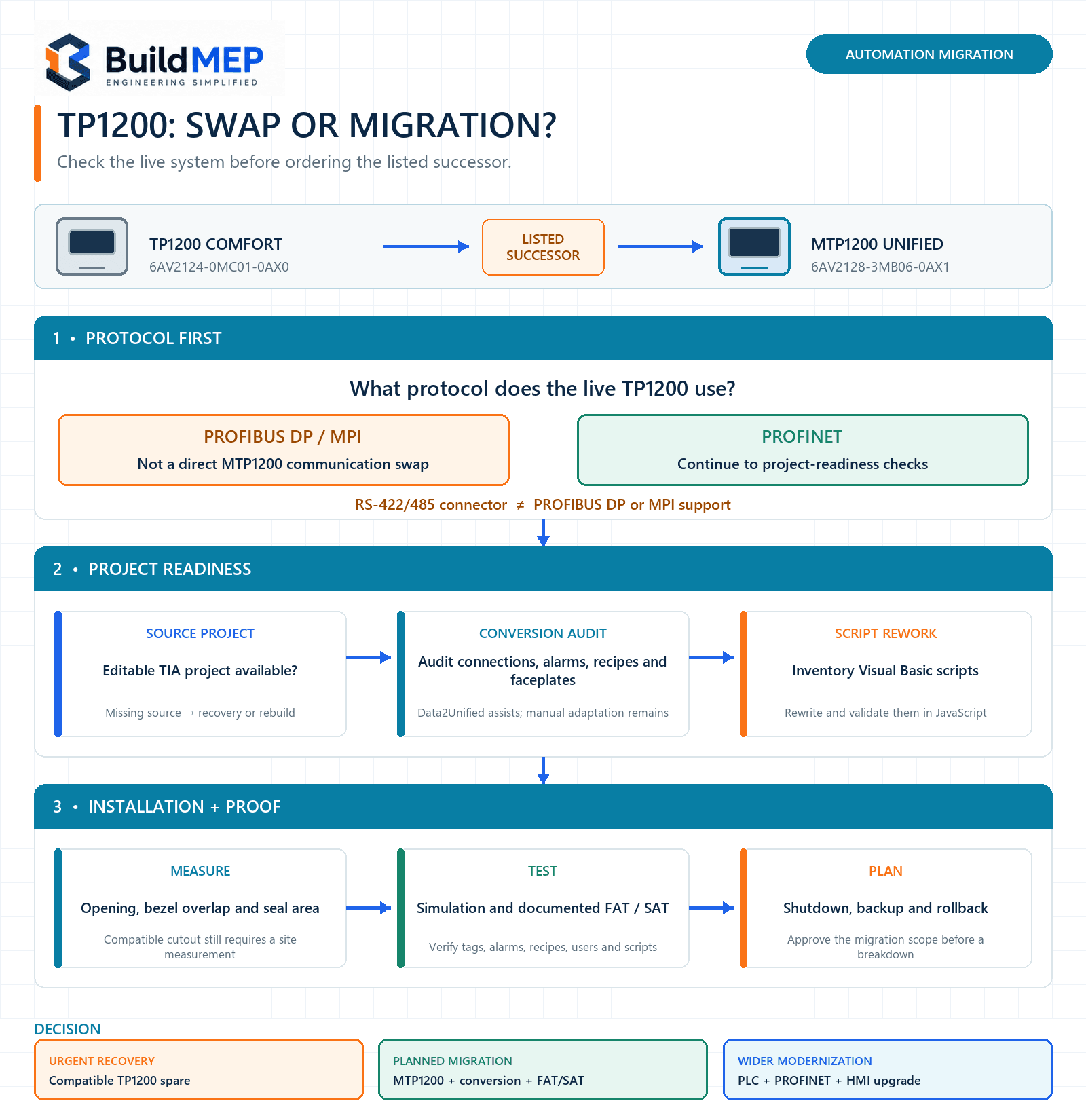
Siemens lists the MTP1200 Unified Comfort, article number 6AV2128-3MB06-0AX1, as the official successor to the TP1200 Comfort 6AV2124-0MC01-0AX0. That doesn’t mean you can pull the old project onto the new panel and expect it to run.
Screen size and resolution match, and Siemens says the MTP1200 mounting cutout works with the TP1200’s. The real changes sit underneath: WinCC Unified runs on a different runtime platform, PROFIBUS/MPI communication isn’t supported at all, every existing HMI connection needs new engineering work, and none of your Visual Basic scripts get auto-converted to JavaScript.
What Siemens currently lists
As of our last check, Siemens’ product page for 6AV2124-0MC01-0AX0 names 6AV2128-3MB06-0AX1 as the successor and flags lifecycle status PM400—Announcement of product phase-out, with a PLM effective date of 31 January 2026. Stock, repair service, and availability vary by country, so nail down the exact article number and regional supply situation before you settle on a spare-parts strategy.
Evidence reviewed: 28 August 2026. Lifecycle data and engineering tools shift over time — check Siemens Industry Mall and Siemens Industry Online Support again once the project actually kicks off.
The hardware price isn’t the real cost
Most breakdown calls start the same way: “Can we just order the successor?” The costly part shows up later, mid-shutdown, when someone discovers the HMI-to-PLC protocol isn’t supported, or the only file on hand is a backup instead of the editable TIA Portal project, or years of undocumented VB scripts are quietly running recipes, navigation, and operator calculations.
That’s why this decision needs to happen before procurement, not during it. Map the live network, recover the source project, run the modernization analysis, go through the scripts and special objects, then estimate downtime and testing. The panel itself is only one line item in that scope.
Five gates to clear before you order
- Protocol
Nail down whether the live HMI connection runs PROFINET, PROFIBUS DP, MPI, or something else. - Source
Confirm you actually have an editable TIA Portal project — not just a panel backup. - Conversion
Inventory every script, faceplate, alarm, archive, recipe, driver, and unsupported object. - Mechanical
Measure the opening, door flatness, seal area, rear clearance, and connector access. - Validation
Line up engineering software, simulation, FAT/SAT scope, a rollback plan, and shutdown time.
If any one of these gates is still open, treat the purchase as a migration risk, not a routine spare-parts swap.
TP1200 Comfort vs MTP1200 Unified Comfort
| Check | TP1200 Comfort 6AV2124-0MC01-0AX0 |
MTP1200 Unified Comfort 6AV2128-3MB06-0AX1 |
Replacement implication |
|---|---|---|---|
| Engineering/runtime | WinCC Comfort from V11; Windows CE 6.0 | WinCC Unified Comfort from V16; Linux-based Industrial OS | Migration You can’t just download your existing Comfort project onto the Unified panel. |
| Display | 12.1 in; 1280 × 800 | 12.1 in; 1280 × 800 | Aligned Matching resolution still doesn’t let you skip a review of screen objects and navigation. |
| PLC communication | PROFINET, PROFIBUS DP and MPI supported | PROFINET supported; PROFIBUS DP and MPI not supported | Stop if DP/MPI Redesign the connection, or hang onto compatible hardware instead. |
| Serial connector | SUB-D RS-422/485 used for MPI/PROFIBUS capability | RS-422/485 SUB-D available, but not as PROFIBUS/MPI support | Don’t assume protocol support just because the connector looks familiar. |
| Scripting | Visual Basic Script supported | JavaScript supported | Manual work Data2Unified won’t turn your VB code into working JavaScript on its own. |
| Industrial Ethernet | One interface with two-port switch | Two interfaces: two-port switch plus independent port | A genuinely useful upgrade, but you still need to review network architecture, addressing, and security. |
| USB Type-A | 2 × USB 2.0 | 4 × USB 3.1 Gen 1 | Check your existing peripherals and the supported Unified workflow — don’t just count ports. |
| Mounting cutout | 310 × 221 mm | 310.6 × 221.1 mm | Compatible Siemens lists the MTP1200 as mounting-cutout compatible with the TP1200 — but verify the actual opening and sealing surface yourself. |
| Front housing | 330 × 241 mm | 326 × 237 mm | The new bezel is 4 mm smaller in overall width and height. On a centered opening, this reduces overlap by about 2 mm on each edge. |
| Mounting depth | 64 mm | 64 mm | Matches on paper — still check plugs, cable bend radius, clamps, and whatever equipment sits behind the panel. |
Gate 1: prove the live communication path
This is the first go/no-go check. The TP1200 Comfort data sheet supports PROFINET, PROFIBUS, and MPI. The Unified successor handles PROFINET for the PLC connection; Siemens’ own port comparison keeps its general RS-422/485 connector separate from actual PROFIBUS support.
If your operating panel talks over PROFIBUS DP or MPI, the MTP1200 won’t replace it directly on the communications side. Moving to PROFINET can touch PLC capability, hardware configuration, addressing, managed-switch design, cable runs, cybersecurity, program logic, and commissioning. A gateway isn’t automatically the safe workaround either — it’s one more powered device, one more configuration to manage, one more thing that can fail.
Don’t guess a fieldbus from the connector
A SUB-D connector with an RS-485 electrical interface tells you nothing about whether PROFIBUS DP or MPI is actually supported. Pull the protocol from the live project, the PLC hardware configuration, the network drawings, and the verified operating connection. The protocol decides compatibility — not what the connector looks like.
Gates 2 and 3: source project and conversion scope
A backup that can restore another TP1200 is not the same thing as an editable TIA Portal source project. For a proper migration, you need the correct project version, libraries, passwords, PLC symbols, HMI connections, and any external files your scripts or recipes rely on.
Siemens does provide the Data2Unified TIA Portal add-in to move supported content across, but it isn’t a “run the tool, download, done” process. Siemens is upfront that HMI connections, range pointers, and time synchronization don’t transfer automatically. Expect preparation, transfer, manual adaptation, compilation, simulation, and testing. You’ll need to rebuild existing HMI connections by hand and check every associated tag.
Items that deserve an explicit inventory
- HMI connections, tag addressing and PLC driver compatibility
- VB scripts, scheduled tasks and file-system functions
- Screen templates, slide-ins, pop-ups, faceplates and navigation
- Alarms, acknowledgements, message archives and retained behaviour
- Recipes, parameter sets, user administration and audit requirements
- Historical archives, CSV or database interfaces and external storage
- Language resources, fonts, graphics and any custom controls
VB scripts tell you how big this job really is
The TP1200 Comfort runs Visual Basic Script; WinCC Unified runs on JavaScript. Siemens’ own Data2Unified manual says plainly that VB code doesn’t convert into JavaScript. The tool can keep script references intact and surface the VB content for review, but an engineer still has to write and validate the JavaScript replacement.
Count the scripts, then sort out what each one actually does. A ten-line cosmetic script isn’t in the same category as a recipe export, a production calculation, a user-authority check, or a fault-recovery routine. Write down triggers, tag reads and writes, file paths, timing assumptions, and what the operator sees — before anyone starts rewriting code.
Gate 4: “mounting-compatible” still needs a tape measure
The nominal cutouts differ by just 0.6 mm in width and 0.1 mm in height, and Siemens’ Unified Comfort operating instructions specifically call the MTP1200 mounting-cutout compatible with the TP1200. That’s a stronger claim than simply eyeballing two rounded catalogue numbers.
Even so, compatible doesn’t mean skip the inspection. The MTP1200 front housing measures 326 × 237 mm against 330 × 241 mm for the TP1200. On a centered opening, that’s roughly 2 mm less bezel overlap per side. Go check an opening that’s been enlarged, unevenly filed, or warped after years in service. While you’re there, look at the flat sealing area, door thickness, corrosion, access to the mounting clips, and the bend radius on every cable.
What the Unified panel actually adds
Yes, this is a platform migration — but it can bring real gains, not just replace hardware that’s aging out.
| Capability | TP1200 Comfort | MTP1200 Unified Comfort |
|---|---|---|
| Touch technology | Analog-resistive, single touch | Multi-touch |
| Variables per device | 2,048 | 8,000 |
| Configurable screens | 500 | 1,200 |
| Objects per screen | 400 | 800 |
| Entries per archive | 20,000 | 500,000 |
| Configured users | 50 | 200 |
| SVG support | No | Yes |
| Backlight MTBF at 25 °C | 80,000 h | 50,000 h |
These are platform capacity numbers, not a guarantee that every legacy object or behavior carries over. A bigger limit is not a substitute for a functional test.
Worked example: breakdown spare or planned migration?
Assumed example: the numbers below walk through the decision method — they aren’t pulled from the actual customer project mentioned earlier.
Existing system: TP1200 Comfort on an S7-300, PROFIBUS DP HMI connection, editable TIA Portal source on hand, 14 VB scripts, two recipe exports to USB, and a six-hour shutdown window.
- Protocol check: fails outright — the MTP1200 doesn’t support the existing PROFIBUS DP connection.
- Source check: passes; the editable project is on hand.
- Conversion check: turns up at least 14 script rewrites plus recipe/export verification.
- Mechanical check: probably fine per Siemens’ guidance, but the smaller bezel still calls for an opening and seal inspection.
- Validation check: six hours isn’t nearly enough for a first-time migration covering network redesign, conversion, testing, and rollback.
Decision: don’t order the MTP1200 as an emergency drop-in spare here. If a verified, working TP1200 is available through a legitimate channel, use it to keep the line running while the Unified migration gets engineered, simulated, and scheduled as its own project. The long-term plan needs PROFINET architecture, script rewrites, FAT/SAT, and a tested rollback strategy.
Choose the right path
| Situation | Recommended path | Minimum controls |
|---|---|---|
| Immediate breakdown; PROFIBUS/MPI; no migration window | Source a verified compatible TP1200 repair/spare if you can find one, and plan modernization separately | Authenticate the supply, match article/firmware, verify the backup, and test restoration before you rely on it |
| PROFINET already used; source project available; limited scripts | Plan a controlled MTP1200 migration | Modernization analysis, Data2Unified workflow, simulation, connection recreation, FAT/SAT and rollback |
| PROFIBUS/MPI but PLC and network are also being modernized | Fold the HMI into the wider controls upgrade | Network architecture, PLC/HMI interface specification, cybersecurity, staged commissioning and integrated testing |
| Editable source project missing | Treat it as a recovery/rebuild until you have evidence otherwise | Document screens, tags, alarms, recipes, scripts, users and operator workflows from the live system before it fails |
Mistakes that turn a swap into downtime
| Mistake | Consequence | Likely field symptom | Correction |
|---|---|---|---|
| Reading “successor” as “interchangeable” | Migration scope shows up mid-shutdown | Project won’t download or compile for the target | Run the five-gate review before you buy anything |
| Checking the SUB-D connector but not the protocol | Unsupported PLC communication | Panel powers up fine but there’s no live PLC data | Verify the configured HMI connection and protocol against the live project |
| Treating Data2Unified as a full converter | Missing or wrong behaviour | Compile errors, broken navigation, invalid tags or incomplete functions | Follow Siemens’ staged workflow and close out every item in the conversion log |
| Counting scripts without mapping what they do | Critical logic gets rewritten wrong | Recipes, calculations or exports fail under real operation | Build a script register with triggers, inputs, outputs and acceptance tests |
| Assuming nominal cutout compatibility means a good seal | Weaker front protection or a rough-looking install | Visible gaps, weak gasket contact or water/dust ingress risk | Measure the real opening and inspect the whole seal land |
| Testing only a handful of screens on the live plant | Hidden faults reach production | Alarms, recipes, users or edge cases fail after handover | Simulate first, then run documented FAT and SAT cases |
Pre-order and migration handoff checklist
- Record the complete old and proposed article numbers, hardware versions and firmware/runtime versions.
- Export or archive the editable TIA Portal source, libraries, passwords, certificates and external files under site change control.
- Confirm the live PLC type, HMI driver, protocol, addresses, switches and cable route.
- Run the Siemens modernization checker or an equivalent documented project analysis where it applies.
- Inventory VB scripts, connections, range pointers, recipes, alarms, archives, users, faceplates and unsupported controls.
- Measure the panel opening, bezel overlap, door thickness, flatness, rear clearance and sealing condition.
- Define FAT and SAT cases for communications, tags, alarms, interlocks, recipes, scripts, users, archives and restart/recovery behaviour.
- Approve the shutdown plan, backups, rollback hardware, responsible engineer and acceptance authority before anything changes on site.
- Update drawings, network records, asset register, spare-parts list, software archive and recovery instructions once you’re done.
Evidence trail and scope
- Siemens Industry Mall—TP1200 Comfort 6AV2124-0MC01-0AX0: product description, lifecycle/successor note and current catalogue status.
- Siemens technical data sheet—TP1200 Comfort: interfaces, protocols, WinCC platform, dimensions and capacity limits.
- Siemens technical data sheet—MTP1200 Unified Comfort: interfaces, Unified functions, dimensions and capacity limits.
- Siemens, Guide for switching from Comfort Panels to Unified Comfort Panels, Article ID 109768002: successor mapping, port comparison, platform differences, migration planning and testing workflow.
- Siemens, Data2Unified TIA Portal Add-in, Article ID 109770510: supported transfer workflow and the limitation that VB code is not converted automatically to JavaScript.
- Siemens, Unified Comfort Panels operating instructions: installation requirements and MTP1200-to-TP1200 mounting-cutout compatibility.
This guide covers the two article numbers named above — it’s not a commissioning procedure for every Comfort/Unified panel, PLC, TIA Portal release or plant network out there. Double-check current Siemens documentation, regional lifecycle status, licenses, project version and your site’s change-control requirements.
Focused questions
Can firmware turn a TP1200 Comfort into a Unified panel?
No. The two devices run different runtime platforms and are built as different target devices entirely. A Unified project needs Unified-capable hardware, full stop.
Does the MTP1200 physically fit the TP1200 cutout?
Siemens lists the MTP1200 as mounting-cutout compatible with the TP1200. Still, measure the real opening and sealing surface — site-made openings can end up larger than nominal, and the MTP1200 bezel runs smaller.
Will Data2Unified convert every part of the project?
No. It transfers what’s supported and helps with the rest. Siemens documents manual work for connections and other functions, and VB code is not converted into JavaScript automatically.
Can the MTP1200 replace a PROFIBUS-connected TP1200?
Not as a straight fieldbus swap. The HMI communication has to move to a supported architecture — usually PROFINET — or the facility keeps compatible hardware around until a broader controls migration is finished.
Related BuildMEP guides
Siemens GCA166.1E vs GCA161.1E: replacement compatibility BACnet, Modbus and control-signal layers explained Automation engineering paths, skills and project evidence