
Before comparing smart thermostats, check whether the Honeywell RTH9585WF matches your HVAC system and wiring. The C-wire is a starting point, not the whole compatibility check.
This review examines manufacturer documentation and compatibility checks. No hands-on installation, measured energy saving or long-term reliability trial is documented here.
Manufacturer source checked 13 October 2026: the Honeywell Home RTH9585WF product and support page identifies Total Connect Comfort and lists the product as discontinued/unavailable. Confirm the exact variant, support and warranty before buying remaining stock.
The RTH9585WF requires a 24 VAC supply with a C (common) connection. C is the transformer return path; the supply is across R/Rc and C as specified for the system. The manufacturer says it will not power up without C. A connected wire alone does not establish correct power or system compatibility.
Check the exact model manual, existing terminal labels and equipment type before buying. If the wiring cannot be identified confidently, involve an HVAC contractor.
Short answer: this is a touchscreen Wi-Fi thermostat with a user-set 7-day schedule. Smart Response adjusts recovery timing to reach the scheduled temperature; it does not create an occupancy-based schedule for you. Check compatibility and the cost of providing C before comparing prices.
Step One: Check Your Wiring
Turn off power to your heating/cooling system at the breaker. Pull the existing thermostat off its wall plate — most lift off, some have screws or clips. You’ll see solid-core wires landed on lettered terminals.
What you’re looking for:
| Terminal | Wire function |
|---|---|
| R / Rh / Rc | 24V power from the transformer |
| W | Heat call |
| Y | Cooling call |
| G | Fan |
| C | Common — the return path. This is the one that matters. |
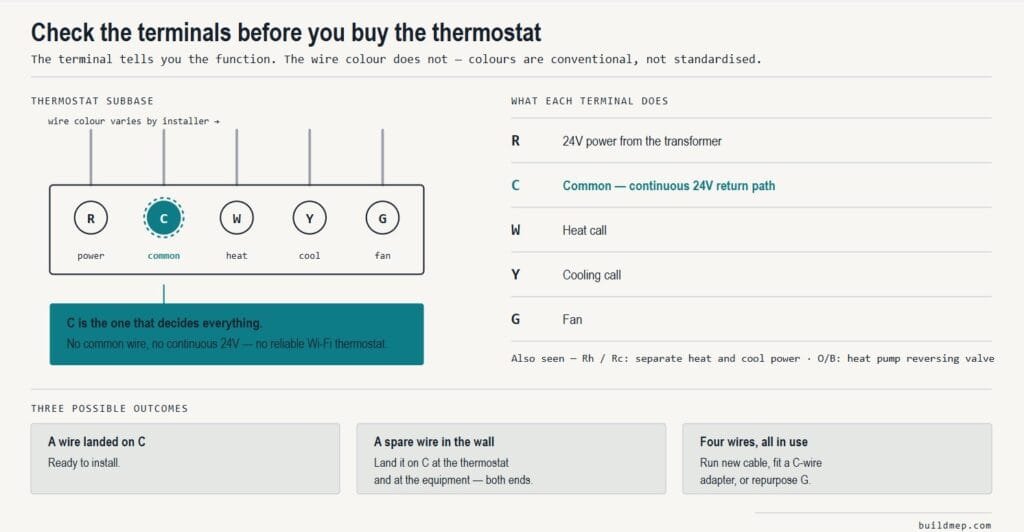
Take a photo before you disconnect anything. Wire colours are conventional, not standardised — a blue wire is not guaranteed to be a common. The terminal it lands on tells you what it does; the colour does not.
Three outcomes:
- A wire on C → verify its equipment-end connection, the 24 VAC system type, stages and the exact wiring diagram before installation.
- No wire on C, but a spare unconnected wire tucked into the wall → very common. That spare can usually become your C-wire, but it has to be landed at the equipment end too. Both ends, or it does nothing.
- Only four wires, all in use → check the manufacturer-approved options for that specific system; a generic wiring shortcut is not enough.
Manufacturer user guide for RTH9585WF1004 (English/Spanish, 33-00269ES).
If You Don’t Have a C-Wire: Check These Options
Choose an option after checking the thermostat and equipment manuals. These are planning choices, not a substitute for the wiring diagram.
1. Run a suitable new cable. Choose the cable type and conductor count for the equipment, thermostat and local installation requirements. Five conductors may suit a simple conventional system, but multi-stage and heat-pump systems can require more.
2. Use an existing unused conductor. Confirm continuity and connect it to the appropriate common at both ends according to the equipment diagram. Two-transformer systems need particular care; do not combine transformer circuits by assumption.
3. Check an approved C-wire adapter. Confirm the exact adapter model, RTH9585WF variant and HVAC circuit against the manufacturer wiring instructions. Adapters have system and terminal requirements; a brand name alone does not prove compatibility. Do not assume they work for heat-only, communicating or every heat-pump installation.
4. Ask about an approved alternate-wiring arrangement. Repurposing G is not a universal fix. It can remove independent fan control and may require other equipment-side wiring changes for safe fan operation during cooling. Use only the exact manufacturer-supported diagram for the system; do not simply move G to C.
Power requirement: this model is powered from the HVAC 24 VAC circuit. Batteries are not an alternative operating supply. Do not diagnose Wi-Fi faults as battery problems on this model.
A note on scope. Isolate equipment power before wiring. An air-handler or furnace enclosure can contain line voltage even though thermostat wiring is nominally 24 VAC. Follow local requirements and use a qualified contractor for unidentified circuits or equipment-side changes.
What This Thermostat Actually Is
A colour touchscreen programmable thermostat with Wi-Fi for compatible 24 VAC HVAC systems. It is not for millivolt fireplace circuits or 120/240 V electric baseboard circuits. Check the exact variant, stages, heat-pump auxiliary/emergency heat and any communicating controls against the manual.
You program the 7-day schedule. Smart Response learns heating and cooling recovery times so it can start early enough to reach the set temperature at the scheduled time. That is different from learning occupancy and automatically writing a household schedule.
It suits you if:
- You want to choose scheduled temperatures and times, while allowing Smart Response recovery if enabled
- Your household routine is regular and predictable
- You’d rather have a large, legible display than a minimalist one
- You want smart-home integration without a subscription
It doesn’t suit you if:
- You want the thermostat to figure out your patterns for you
- Your schedule is irregular enough that automatic occupancy detection would genuinely help
- You need room-by-room sensing to deal with an unevenly conditioned house — that’s a different product category, and no single-point thermostat solves it
Uneven room temperatures can reflect airflow, insulation, local loads, sensor placement or control settings. A single-point thermostat does not directly balance airflow. Diagnose the cause before choosing a new thermostat or remote-sensor arrangement.
The App and Brand Situation
Check the brand, support provider and model-specific registration instructions:
The Honeywell Home brand is used under licence by Resideo Technologies, which was spun out of Honeywell. Support, apps and warranty go through Resideo, not Honeywell International.
The supported registration route is:
- Total Connect Comfort (TCC) — the established app this thermostat registers to
- Check current support before migrating apps — do not assume every Resideo-branded app supports this thermostat
The manufacturer product page specifies Total Connect Comfort, with no monthly monitoring fee for its basic app functions. Follow the current registration instructions for your model and region.
Integrations include Alexa, Google Assistant, and other smart-home platforms — verify current compatibility on Resideo’s product page rather than trusting any review’s list, this one included, since integrations get added and dropped.
Installation Notes Worth Knowing
- Photograph the existing wiring before disconnecting. Every time.
- Power off at the breaker, not just at the system switch.
- Don’t let wires fall into the wall cavity. Standard trick: wrap them around a pencil, or clip them, before you pull the old base off.
- Replacing a mercury thermostat? Older units with a glass ampoule of silver liquid contain mercury and must not go in household waste. In the US, the Thermostat Recycling Corporation handles disposal; elsewhere, check local hazardous waste rules.
- Set the system type correctly during setup — confirm heat pump or conventional equipment against the manual. An incorrect selection can produce operating symptoms that resemble a thermostat fault.
Verdict
The RTH9585WF is worth considering when your system is compatible and you want a large colour screen with a user-set schedule and remote control. A C-wire alone is not sufficient to recommend it. Check the exact variant, available support and warranty before purchasing; the manufacturer currently marks variants as discontinued or unavailable.
If you do not have C, price the approved wiring solution and installation before buying. Compare the complete installed cost with other compatible thermostats.
The price fluctuates too much to support a useful quote, so check the current availability and if you are looking for a contractor, remember to look for the price of the smart thermostat plus installation.
Related Reading
- The home MEP toolkit — including why the multimeter you use to identify these wires needs the right CAT rating
- How to reduce your AC bill in summer — thermostat strategy that works regardless of which model you fit
- FCU vs AHU vs FAHU explained — for readers whose “thermostat” controls something rather different
Frequently Asked Questions
Does the Honeywell RTH9585WF need a C-wire?
Yes. It requires a 24 VAC circuit with a C common return. The manufacturer says it will not power up without C. Any new conductor or adapter must match the exact thermostat and equipment wiring instructions.
Can I run it on batteries instead?
No. Batteries are not an alternative operating supply for this model; provide the specified 24 VAC power and common connection.
What happens if I use the G wire as my common?
Do not simply move G to C. An approved alternate-wiring arrangement can remove independent fan control and can require additional equipment-side changes. Verify the exact system diagram with the manufacturer or an HVAC contractor.
Does it learn my schedule like a Nest?
You set its 7-day schedule. Smart Response learns recovery timing to reach your chosen temperature on time; it does not automatically create an occupancy-based schedule.
Which app does it use?
The manufacturer specifies Total Connect Comfort for registration and remote control. Follow current model-specific support instructions before changing apps.
Will a smart thermostat fix a room that’s always cold?
Not by itself. Investigate airflow, insulation, local loads, sensor placement and control settings. A thermostat or remote sensor can change how temperature is measured and controlled, but it does not directly correct duct restrictions or balance airflow.