
Tridonic LED driver codes are tricky when you understand them properly. You will find a surprising amount of information in an LED driver’s model number: wattage, current range, dimming protocol, housing, and even the product generation. Once you know how to read it, you can spec or cross-check a driver from the code alone, without pulling up a datasheet.
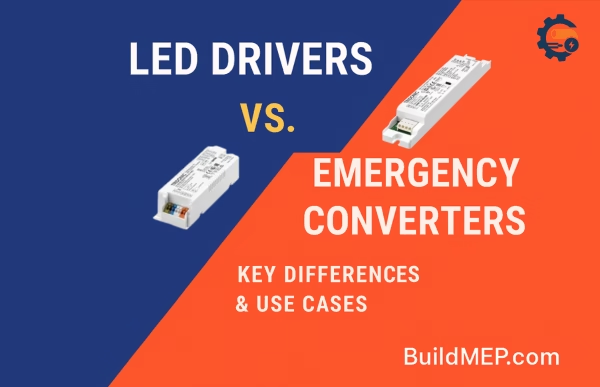
It’s worth getting right. Grab the wrong current range or miss a non-SELV rating, and you’re either damaging the LED module or ending up with an installation that doesn’t meet code. If you’re still deciding whether you need a standard driver at all versus an emergency lighting converter, our guide on LED drivers vs. emergency converters covers that distinction first. This one picks up from there once you already know which driver you’re buying and just need to decode the label.
How Tridonic Driver Codes Are Built
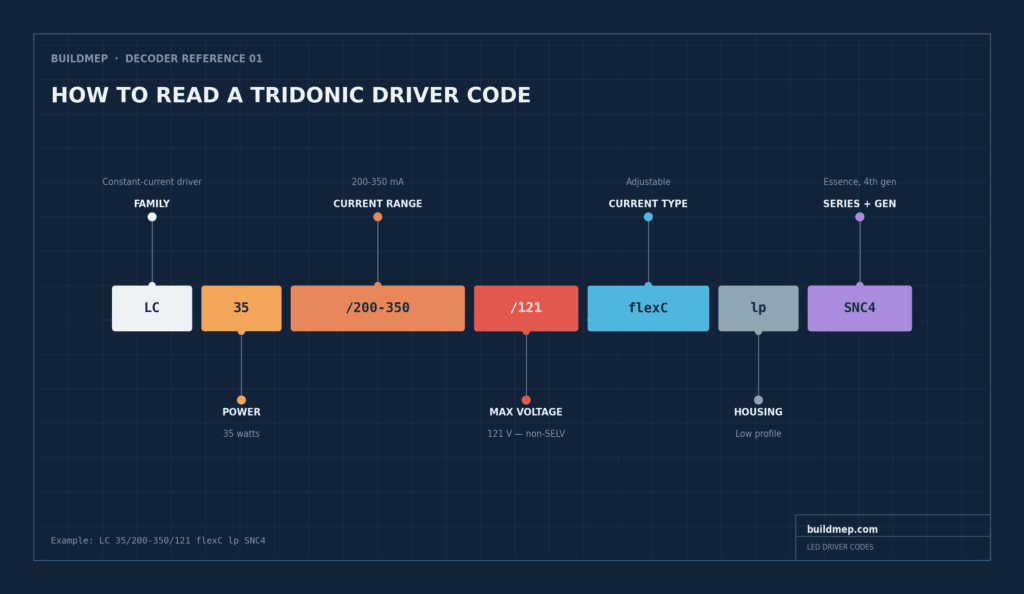
Tridonic LED driver codes as an example: LC 35/200-350/121 flexC lp SNC4. Broken apart, it reads as:
- LC: driver family (constant current)
- 35: power in watts
- 200–350: output current range in mA
- /121: maximum output voltage, 121 V
- flexC: adjustable current type
- lp: low profile housing
- SNC4: Essence series, 4th generation
Six pieces of information packed into about twenty characters. Here’s what each one actually tells you.
Step 1: Driver Family (the Prefix)
The first letters tell you which family you’re dealing with:
- LC: standard constant-current driver, the one you’ll see most often
- LCA: the “advanced” version, usually with multi-protocol dimming built in
- LCI: independent driver with strain relief, meant for remote mounting away from the fixture
- LCO: outdoor and IP-rated, typically IP65 or IP67
Get the family wrong and none of what comes next (power, dimming compatibility) really matters, so it’s worth reading this part slowly.
Step 2: Power and Wattage
Next comes the wattage: 20 W, 35 W, 50 W, and so on. Match it to your actual LED load, and build in 10–20% headroom where you can. Undersizing here is one of the more common reasons a driver runs hot and fails early.
Step 3: Output Current and Voltage
After power comes current type and range:
- flexC: adjustable current, set via DIP switches, I-Select, or NFC
- fixC: fixed at one current value
Then there’s a number after a slash. That’s the maximum output voltage, and it’s the one figure on this whole label that actually matters for safety. /54 means 54 V max, which falls under SELV. /121 means 121 V max, which is non-SELV.
Safety note: output at or below 60 V is generally treated as SELV (safety extra-low voltage). Above that, it’s non-SELV and may call for extra installation precautions depending on your local code.
Match the current to your LED module’s rated draw, and match the max voltage to the string’s forward voltage (Vf). Get either one wrong and you’re either underdriving the LEDs or risking the driver itself.
Step 4: Dimming and Control Protocol
This is where compatibility with your building’s control system actually gets decided:
- one4all (sometimes o4a): multi-protocol, works with DALI, DSI, switchDIM, or 0–10 V
- 0–10 V: the standard across most of North America
- PH-C: phase-cut, for TRIAC or ELV dimmers
- stepDIM: two-level dimming triggered by a mains switch
- D4i / pD+: DALI-2 with data, meaning the driver reports back luminaire info, energy use, and diagnostics
- AUX: an auxiliary output, often used for sensors
If the building already runs a DALI backbone, one4all or D4i keeps you flexible instead of locking into a single protocol.
Step 5: Housing Type
Housing is mostly about physical fit:
- C: compact
- SC: stretched compact
- lp: low profile, for flat fixtures
- SR: includes strain relief, for independent or remote mounting
- h16: ultra-slim, 16 mm
Check this against the fixture’s actual internal clearance before you order, not after.
Step 6: Series and Performance Tier
Last comes the series, which tells you where the driver sits on features and price:
- SNC: Essence, the budget/economy line
- EXC: Excite, a balance of features and cost
- PRE: Premium, the most advanced features and DALI-2 options
- ADV: an older “Advanced” series, still around on some SKUs
A number after the series code is the generation. SNC4 means 4th-generation Essence.
Quick Reference Table
| Tridonic LED driver codes | What It Tells You | Example |
|---|---|---|
| LC / LCA / LCI / LCO | Driver family | LC = constant current; LCO = outdoor |
| 35 W / 50 W | Max power | Choose ≥ LED load |
| 200–350 mA | Current range | flexC (adjustable) or fixC (fixed) |
| /54, /121 | Max output voltage | 54 V = SELV; 121 V = non-SELV |
| one4all / 0–10 V | Dimming and control | Match to your control system |
| C / SC / lp / SR / h16 | Housing type | lp = low profile |
| SNC / EXC / PRE | Feature tier | PRE = premium |
Real-World Examples, Decoded
LCA 45W 500–1400mA one4all SC PRE: 45 W, adjustable 500–1,400 mA, one4all multi-protocol dimming, SC housing, PRE premium tier. Best for commercial luminaires with advanced controls. (That link goes to the actual Tridonic datasheet for this exact part, if you want to see the full spec.)
LC 20W 700mA fixC C SNC: 20 W, fixed 700 mA, compact housing, SNC economy tier. Best for simple residential or office fixtures.
LC 35/200-350/121 flexC lp SNC4: 35 W, adjustable 200–350 mA, max 121 V (non-SELV), low profile housing, 4th-gen Essence. Best for slim linear fixtures running long LED strings.
LC 50/400-1400/54 0-10V AUX lp EXC UNV: 50 W, adjustable 400–1,400 mA, max 54 V (SELV), 0–10 V dimming plus an AUX output, low profile, Excite tier, universal voltage input (120–277 V). Best for North American offices and retail.
LCO 90W 200-1050mA 165V pD+ NF C PRE3: outdoor-rated, 90 W, adjustable 200–1,050 mA, max 165 V for long strings, pD+ DALI-2 with data, NFC programmable, 3rd-gen Premium. Best for street and outdoor luminaires.
Before You Order: A 6-Point Checklist
- Current (mA) matches the LED module’s rating
- Power (W) is at or above the LED load, with headroom
- Max voltage covers the LED string’s forward voltage (Vf)
- SELV vs. non-SELV lines up with your installation and code requirements
- Dimming protocol matches your control system (DALI, 0–10 V, or otherwise)
- Housing fits the physical space (C, SC, lp, SR, or h16)
Tridonic isn’t the only manufacturer packing specs into a model number this way: Osram, Inventronics, Mean Well, and others each run their own version of the same shorthand. If you’re speccing outside Tridonic, our Find Alternatives section covers how other brands structure theirs, and our Electrical Engineering section has more guides like this one.
Frequently Asked Questions
How do I tell if a driver is SELV?
Check the maximum output voltage in the code or the datasheet. 60 V or below is generally treated as SELV; anything above that is non-SELV.
flexC vs. fixC: which should I choose?
flexC gives you adjustability across different LED boards, useful if you’re not locked into one exact current. fixC is simpler and works fine if you’re always driving the same current.
What does “one4all” actually mean?
It’s Tridonic’s multi-protocol dimming input, meaning one driver works across DALI, DSI, switchDIM, and 0–10 V control systems instead of needing a different driver per protocol.
What does UNV mean on a driver code?
Universal input voltage, typically 120–277 V AC, meaning the same driver works across most North American mains voltages without a separate SKU.
Why does the driver family (LC vs. LCA vs. LCO) matter so much?
Because it determines what’s even possible before you get to power, dimming, or housing. LCO, for instance, is outdoor-rated; if you need IP65 protection and pick a standard LC by mistake, no combination of power or dimming options fixes that.