
HVAC controls | Operations and handover
Picture the call-out. A shop floor is warm, so someone opens the FCU control panel on the BMS, finds the unit, and reads HIGH SPEED next to the fan. The unit is running flat out, so the problem must be the chiller, or the coil, or the water. A technician gets sent to the plant room.
Except the fan was on low speed. The panel was showing a selection made thirty seconds earlier next to a status that had not caught up, and nobody read the second line.
This is the most common way an FCU control panel misleads the person reading it, and it has nothing to do with the panel being faulty. It happens because the panel shows two completely different kinds of information in the same table, in the same font, and expects you to know which is which.
A panel shows commands and it shows status. They are not the same thing.
Every field on an FCU detail page is one of two kinds.
A command point is what somebody asked the unit to do: the run/stop selection, the fan speed selection, the operating mode, the setpoint you typed at the keypad. These change the instant you touch them, because all they record is the request.
A status point is what the system reports came back: the reported fan speed, the valve percentage, the space temperature, the active setpoint the unit is controlling to. These change when the controller has processed the request, the device has responded, and the value has travelled back through the network to the screen.
Between those two events there is a gap. On a healthy system it is a few seconds. Inside it the panel is telling you two different stories at once, and both are true. Only one of them is about the equipment.
Four moments where this catches people out
1. The speed you selected is not the speed it is running
Here the operator has just selected LOW SPEED. The status line still reports HIGH SPEED.
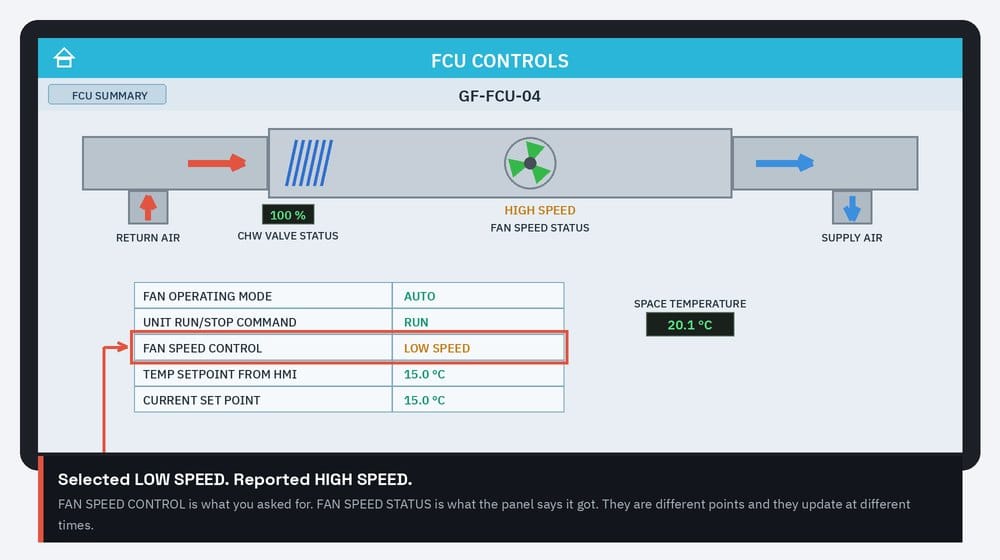
Nothing is wrong in that frame. The command has registered and the status has not updated yet. The mistake is walking away having read either line alone, recording “running at high speed” when the unit is about to drop to low, or recording “set to low speed” as though that settles what the fan is doing.
If the two lines still disagree after the normal response time on your site, that is a different matter and worth writing down. Repeating the command is not a fix. It only hides whatever is failing between the panel and the fan.
2. Entering a setpoint is not changing the setpoint
The keypad closes, the panel accepts 22.0, and the job feels finished. It is not.
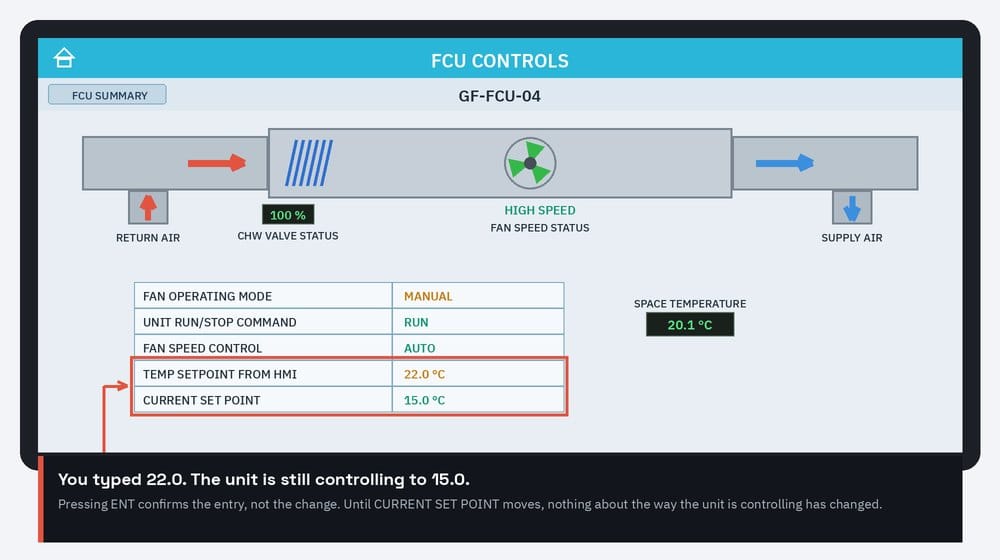
The entry field holds what was typed. The current setpoint holds what the unit is controlling to. Until the second one moves, the control loop has not changed, and the room carries on doing exactly what it was doing.
This is where a setpoint change quietly fails and nobody notices for a week. An accepted range can silently reject your value, a local thermostat can have priority over the panel, or a schedule can overwrite it at the next time step. All of those look identical from the entry field. None of them look the same from the active setpoint.
3. A stopped unit can still display a speed
This is the one that sends people to the plant room for no reason.
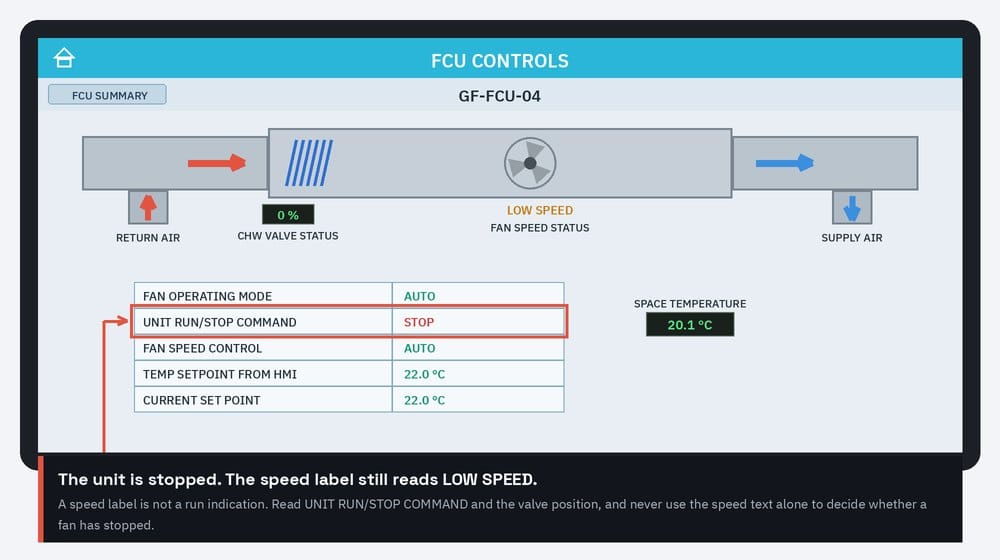
The unit is stopped, the valve is at zero, the fan graphic has gone grey, and the speed text still reads LOW SPEED. A speed label is not a run indication. It is the last speed band selected or reported, and many graphics simply have no “off” state to display.
Read the run/stop command, the valve indication and the summary row together. Any one of them alone will let you down eventually.
4. A valve at 100 percent does not mean cooling
A valve indication is almost always a command or a position. It is not a flow measurement. A valve can read 100 percent while the actuator has failed in place, the upstream strainer is blocked, a balancing valve is shut, or the water reaching the coil is far warmer than it should be.
A valve at 100 percent with a warm room is not evidence that the controls are doing their job. It is the starting point of the investigation, not the end of it. If you are working through why a chilled water FCU is not delivering, the notes on pressure-independent control valves cover what the valve can and cannot guarantee.
What each field actually proves
| Field | What it proves | What it does not prove |
|---|---|---|
| Unit run/stop command | The requested run state | That the fan is turning, or that power has been removed |
| Fan speed control | The speed that was selected | The speed the fan is running at |
| Fan speed status | The speed the panel reports | Whether that figure is measured feedback or a software state |
| Fan operating mode | Auto or manual | The speed selection, which is a separate field |
| Setpoint from panel | The value that was typed | That the unit is controlling to it |
| Current setpoint | The value the unit is controlling to | Whether a thermostat or schedule can still override it |
| Valve status (%) | A valve command or position | That water is flowing or cooling is being delivered |
| Space temperature | The configured sensor’s reading | Sensor accuracy or calibration date |
The question most handovers never answer
Everything above assumes you know which status points are real. Many are not.
“Fan speed status” can be genuine feedback from a current sensor, a differential pressure switch across the fan, or an auxiliary contact on the starter. Or it can be the controller echoing its own output back to the screen, in which case it will happily report HIGH SPEED to a fan with a seized motor, a tripped overload or no power at all.
Both are normal designs and both look identical on the graphic. The difference only matters on the day something breaks, which is exactly the day nobody can find out which one they have. How those signals reach the controller is a design choice in its own right, covered in BACnet vs Modbus vs 0-10V vs 3-position control signals.
Ask for this at handover, in writing: for each status point, is it physical feedback or a software state? If the O&M manual does not say, treat every status point as unverified until someone confirms it at the equipment. It costs nothing to ask now and a great deal to work out at two in the morning.
One safety point, because it is the costly one
STOP on a panel does not isolate anything. It sends a request over a network to a controller that may or may not act on it, and every conductor in the unit stays live. Before any mechanical or electrical work, a qualified person applies the site isolation procedure and verifies isolation at the equipment. A screen that says STOP is not a substitute for a lock and a test.
It is worth saying out loud to anyone new to a panel, because a touchscreen that responds instantly feels far more authoritative than it has any right to. For the mechanical side of FCU upkeep, including the drain tray checks that routine PPM lists tend to miss, see FCU drain tray maintenance.
Three checks worth making a habit
- After any change, read the command field and its matching status field once the normal response time has passed.
- After entering a setpoint, confirm the active setpoint actually moved.
- Never decide whether a fan has stopped from a speed label alone. Use the run command, the valve and the summary row together.
Then record what you saw. Persistent disagreement between a command and its status is a condition to report, not something to clear by sending the command again. Something between the screen and the fan is not doing what it claims, and the only way anyone will ever find it is if the person who saw it wrote down the tag, the time and both readings.
Free download: FCU Controls Handover Record
- Format
- Word (.docx), editable
- Length
- 6 pages
- Price
- Free
The controls side of an FCU handover in one editable document: the command-against-status reading guide as an operator card, a controls equipment register, the handover record a facilities team needs before taking a system over, support contacts, and a running maintenance and fault log. Generic and unbranded, so put your own company details on it.
A record-keeping aid only. It does not set operating limits, test values or warranty terms; those come from your specification, commissioning records and the manufacturer instructions.
These notes come out of writing a controls operation and maintenance manual for a retail fit-out, where the panel sequence had to be documented frame by frame for a facilities team who had never seen it. The first three traps above all showed up in the recording of a perfectly healthy installation.