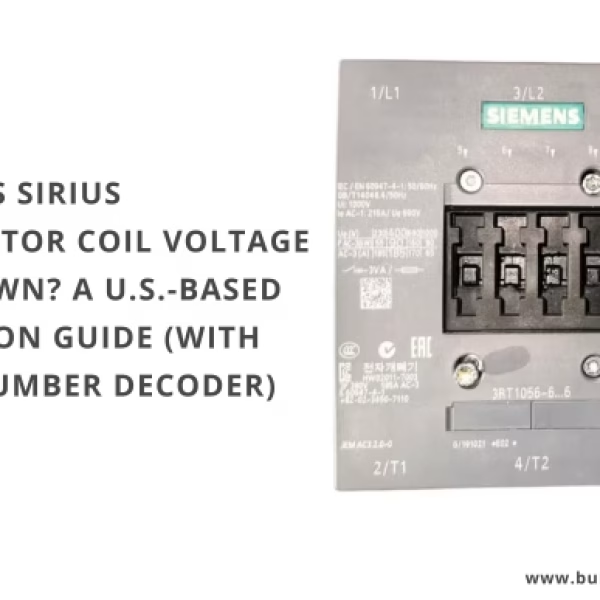



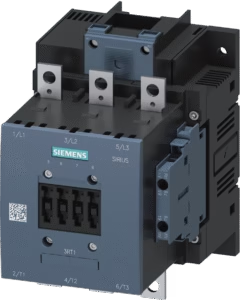
If you’ve ever opened a panel, stared at a Siemens SIRIUS contactor, and thought, “Which coil voltage is this thing?”—you’re not alone. Drawings go missing, labels fade, and downtime doesn’t wait.
This guide shows you exactly how to decode the MLFB (e.g., 3RT1056-6..6), safely verify the voltage at A1/A2, and pick the correct coil code so you can order the right part the first time.
Contents
Safety note:
If you suspect a coil issue, verify voltage presence safely. Do not guess by measuring resistance across A1–A2, as this often provides misleading data on AC coils. Troubleshoot safely.
If you suspect a coil issue, verify voltage presence safely. Do not guess by measuring resistance across A1–A2, as this often provides misleading data on AC coils. Troubleshoot safely.
1. Why this problem is so common
- The front label shows the base contactor (frame/current ratings) but often hides the exact coil variant.
- SIRIUS 3RT1 coils are replaceable; the coil code appears in the full MLFB on the side label, which is often hard to see.
- U.S. control circuits vary: 24 VAC (HVAC), 24 VDC (PLC), 120 VAC (legacy), or 240 VAC (CPT).
2. Step-by-step (U.S. practice)
- Capture the base MLFB from the nameplate. Example:
3RT1056-6..6(S6 frame). - Check the drawings: Look for “Control 120 VAC” or “24 VDC PLC” notes.
- Trace the source: Check the control transformer secondary (480→120 or 480→240).
- Measure safely: With PPE, measure voltage at A1–A2. Record if it is AC or DC.
- Match the code: Use the table below to find the suffix (e.g., AP36).
3. Coil code cheat sheet (Siemens SIRIUS 3RT1)
UC = Universal Coil (works with AC or DC).
| Coil code | Example MLFB | Voltage (UC) | Typical U.S. Use |
|---|---|---|---|
| AB36 | …-6AB36 | 23–26 V | HVAC 24VAC / PLC 24VDC |
| AF36 | …-6AF36 | 110–127 V | Legacy 120 VAC |
| AP36 | …-6AP36 | 220–240 V | 208/240 VAC (CPT) |
Tolerance Tip: UC coils typically work at 0.8…1.1 × Voltage. This is why a 220–240 V coil (AP36) works perfectly on a 208 V control circuit.
4. Ordering checklist
- ✅ Complete MLFB: Ensure you have the coil suffix (e.g., 3RT1056-6AP36).
- ✅ Aux Contacts: S6 frames usually have 2NO+2NC. Need more? Add a block.
- ✅ Coil Kit: If the contactor body is good, just order the withdrawable coil kit to save money.
5. Safety notes
- Follow LOTO (Lockout/Tagout) and UL 508A practices.
- Verify absence of voltage before touching A1/A2.
- Do not over-voltage a coil “just to test” – it will damage the internal electronics.
FAQ
Can I use a 220–240 V coil on 208 V control power?
Often yes. UC coils typically allow 0.8…1.1x tolerance. A 240V coil will usually operate down to ~192V.
Can I replace just the coil?
Yes, on SIRIUS S6 frames, the coil is a withdrawable drawer. You can replace it without removing the whole contactor.